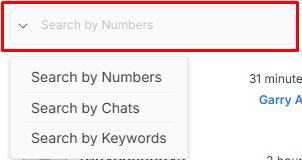
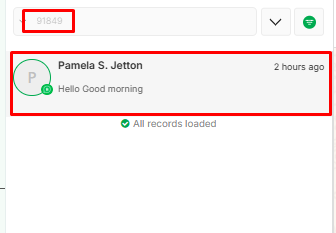
Inbox Search Search By Numbers Allows users to find specific conversations by entering a phone number. Useful for quickly locating messages exchanged with a particular contact. To use this functionality select the search by numbers option from the dropdown.
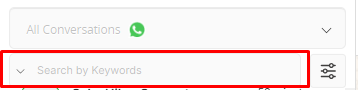
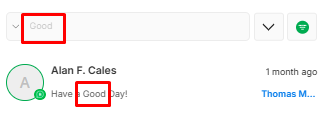
Search By Keyword Enables users to search for specific words or phrases within chats. Helps in quickly locating important messages, links, or details without scrolling through the entire conversation. In WhatsApp Business, businesses can use keyword searches to track customer queries, complaints, or orders.
To use this functionality select the search by keyword option from the dropdown.
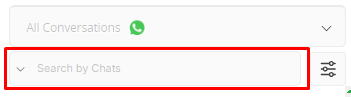
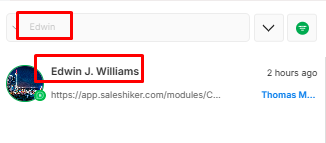
Search By Chat Lets users filter and search within a specific conversation instead of across all chats. This is useful when looking for past messages from a particular contact or group. In WhatsApp Business, businesses can use this to find past conversations with a customer for better context in support or sales interactions.
To use this functionality select the search by Chats option from the dropdown.
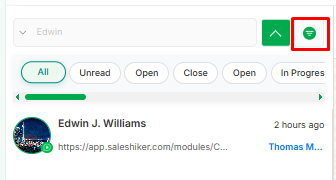
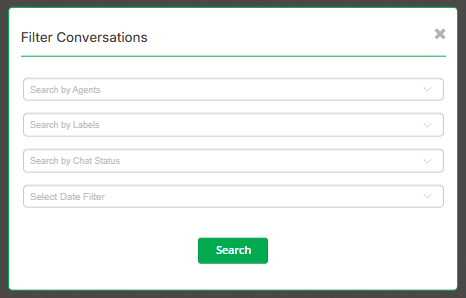
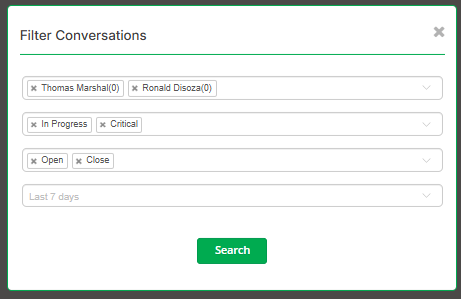
Filter A filter is available here to search all chats assigned to any specific user and also labels can be applied to that filter of the user’s chat list .
The Filter Conversation feature allows users to refine their chat searches based on two key fields:Agent Selection Field Enables users to choose a specific Agent. Displays conversations only with the selected Agent. Label Selection Field Allows users to filter chats based on assigned labels (e.g., “Deal Stage,” “Lead Source,” “Order Alert”). Helps in categorizing and organizing conversations for efficient follow-ups. In WhatsApp Business, labels can be used to prioritize messages and streamline customer management. Search by Chat Status Allows users to filter chats based on their current status, such as Open or Closed . Helps in quickly identifying active conversations that require action and separating them from completed discussions. Improves follow-up efficiency by focusing only on pending or resolved chats as needed. Select date filter Enables users to filter chats based on a specific date or date range. Helps in tracking conversations created or updated within a selected time period. Useful for reviewing daily activities, monitoring campaign performance, or auditing past interactions.
Stop Losing Leads on WhatsApp. Start Closing Them
Over
500+ brands trust
SalesHiker to automate conversations, nurture leads, and convert chats into
revenue .
Get started now and scale your business with powerful WhatsApp CRM and automation.
We use cookies to improve your experience, to analyze our traffic and to provide you with more Privacy Policy
Cookie Settings
Reject All
Allow All Cookies
Cookie Settings
Cancel
Save Preferences


 by
by